zilleq
Well-known member
- Joined
- Sep 24, 2026
- Messages
- 48
- Reaction score
- 98
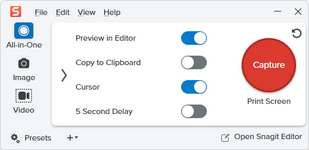
TechSmith Snagit is an advanced screen capture and recording software developed by TechSmith. It is designed to easily create explanatory images, quick tutorials, and visual documentation on Windows and macOS systems.
Key Features
• Flexible screen capture: Allows for capturing the entire screen, a specific window, a custom area, or entire web pages via automatic scrolling.
• Video and audio recording: Records screen activity along with audio from a microphone or the system; it also enables the conversion of short clips into animated GIF files.
• Built-in image editor: Includes tools for adding arrows, text, callouts, shapes, numbered steps, and blur effects to redact sensitive information.
• Text extraction (OCR): Recognizes and extracts editable text from any image or screenshot, allowing it to be pasted into other documents.
• Templates and visual guides: Offers pre-designed layouts that simplify the creation of step-by-step manuals and infographics by combining multiple captures.
Common Use Cases
• Technical support and customer service: Helps provide users with clear visual solutions, avoiding the need for long, text-based explanations.
• Training and education: Enables educators and businesses to create instructional materials and onboarding guides for new employees.
• Remote team communication: Facilitates the quick sharing of visual feedback on designs, documents, or software bugs.
Homepage:
Key Features
• Flexible screen capture: Allows for capturing the entire screen, a specific window, a custom area, or entire web pages via automatic scrolling.
• Video and audio recording: Records screen activity along with audio from a microphone or the system; it also enables the conversion of short clips into animated GIF files.
• Built-in image editor: Includes tools for adding arrows, text, callouts, shapes, numbered steps, and blur effects to redact sensitive information.
• Text extraction (OCR): Recognizes and extracts editable text from any image or screenshot, allowing it to be pasted into other documents.
• Templates and visual guides: Offers pre-designed layouts that simplify the creation of step-by-step manuals and infographics by combining multiple captures.
Common Use Cases
• Technical support and customer service: Helps provide users with clear visual solutions, avoiding the need for long, text-based explanations.
• Training and education: Enables educators and businesses to create instructional materials and onboarding guides for new employees.
• Remote team communication: Facilitates the quick sharing of visual feedback on designs, documents, or software bugs.
Homepage:
Please,
Log in
to view URLs content!