

zilleq
Member
- Joined
- Sep 24, 2026
- Messages
- 7
- Reaction score
- 10
FastKeys Pro is an all-in-one automation software for Windows designed to boost productivity by reducing repetitive tasks and speeding up typing. It serves as an intuitive graphical interface built on the AutoHotkey engine, allowing users to automate mouse clicks, keystrokes, and complex commands without needing to know how to program or write code.
Key Features
Text Expander: Allows you to create custom abbreviations (e.g., typing "dc") that the system automatically replaces with long blocks of text, such as contact details, email templates, or signatures.
Auto-complete: Recognizes text input patterns on the fly and intelligently suggests frequently used words or phrases, minimizing keystrokes.
Keyboard Shortcut Manager: Makes it easy to assign key combinations for instantly opening applications, system folders, files, or specific web pages.
Macro Recorder: Records complete sequences of keyboard and mouse actions for precise later playback, facilitating the automation of complex desktop processes.
Clipboard Manager: Keeps a history of copied items so you can access any of them at any time, overcoming the limitations of the traditional single-item clipboard.
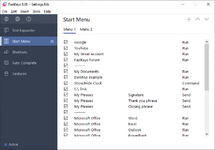
Custom Start Menu: Lets you configure your own desktop pop-up menu to launch frequently used system tools, scripts, or web commands with a single click.

 Homepage:
MEDIAFIRE (5 MB):
Key Features
Text Expander: Allows you to create custom abbreviations (e.g., typing "dc") that the system automatically replaces with long blocks of text, such as contact details, email templates, or signatures.
Auto-complete: Recognizes text input patterns on the fly and intelligently suggests frequently used words or phrases, minimizing keystrokes.
Keyboard Shortcut Manager: Makes it easy to assign key combinations for instantly opening applications, system folders, files, or specific web pages.
Macro Recorder: Records complete sequences of keyboard and mouse actions for precise later playback, facilitating the automation of complex desktop processes.
Clipboard Manager: Keeps a history of copied items so you can access any of them at any time, overcoming the limitations of the traditional single-item clipboard.
Custom Start Menu: Lets you configure your own desktop pop-up menu to launch frequently used system tools, scripts, or web commands with a single click.
MEDIAFIRE (5 MB):