What's new
RevTeam.Re - Reverse Engineering Team

Welcome Guest! Register a free account today to become a member! Once signed in, you'll be able to participate on this site by adding your own topics and posts, as well as connect with other members through your own private inbox! Register and wait for our approve!

FolderMill 5.4

Syntax

Member
Joined
Jun 30, 2024
Messages
12
Reaction score
5

Name and Version

Please, Log in to view quote content!


Description

Please, Log in to view quote content!


Download Link

Please, Log in to view quote content!


Protection

Please, Log in to view quote content!


Limitations

Please, Log in to view quote content!


Activation Method

Please, Log in to view quote content!


Additional Information

Please, Log in to view quote content!
 

bunion

Well-known member
Joined
May 30, 2024
Messages
261
Reaction score
324
Here u go :)

Let me know if JOB DONE

Remember u saw it here 1st!

Enjoy ...bunion
 

Attachments

  • foldermill 5.4 Patcher.zip
    18.9 KB · Views: 19

Syntax

Member
Joined
Jun 30, 2024
Messages
12
Reaction score
5
@bunion I tried your patch, but unfortunately it does not appear to work :(

How to reproduce

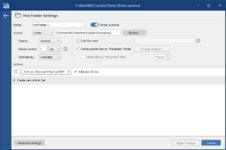
1. Create a new simple Hot Folder like this:

FolderMill_Example_Hot_Folder.png

2. Drag any PDF into the incoming folder and try to save the "Microsoft Print to PDF" output when asked.

Results

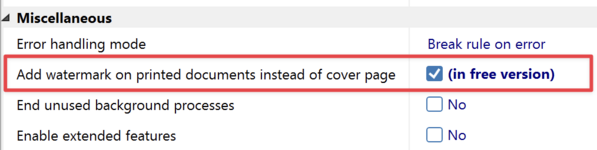
FolderMill_Watermark.png

– If the "Add watermark on printed documents instead of cover page" is checked in FolderMill settings, it results in a printer error (see FolderMill events log) and the output PDF is 0 KB in size.

– If the "Add watermark on printed documents instead of cover page" is unchecked in FolderMill settings, the output PDF works but still has a cover page watermark.

Thanks for looking into it :)
 
Last edited:

bunion

Well-known member
Joined
May 30, 2024
Messages
261
Reaction score
324
Please, Log in to view quote content!
thx for info

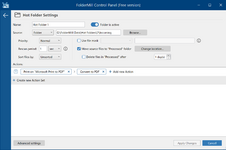
i use this setting ..convert to pdf..after any action and it outputs an ok pdf in the output folder in your hotfolder..see attachment

i removed "created " watermark..but this is a another one "this document"....so ill look into it
 

Attachments

  • screen.png
    screen.png
    82.3 KB · Views: 23

bunion

Well-known member
Joined
May 30, 2024
Messages
261
Reaction score
324
when i convert to pdf...i dont get any "cover" page?
 

Syntax

Member
Joined
Jun 30, 2024
Messages
12
Reaction score
5
Please, Log in to view quote content!
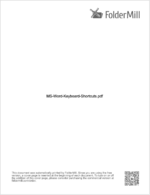
Yeah, there is another "This document..." cover page watermark inserted for the "Print on 'XYZ'" action (see below):
FolderMill_Cover_Page_Watermark.png

This is the case when I uncheck "Add watermark on printed documents instead of cover page". Then it works but prints with the watermarked cover page (on any printer).

If I check that option instead (so watermark instead of cover page), the action "Print on XYZ" does not work at all...

Also, the "Convert to PDF" only seems to work if the "Add watermark on printed documents instead of cover page" is checked, but not when it's unchecked.

It's a puzzle... :unsure:
 

bunion

Well-known member
Joined
May 30, 2024
Messages
261
Reaction score
324
Please, Log in to view quote content!
heres fix for previous problem u had when just using print to pdf action ..microsoft printer etc....who knows might fix ur lates post too.
ive 7ncluded print dll wer u can disable print cover in settings...let me know how u get on
 

Attachments

  • foldermill 5.4 .zip
    97.9 KB · Views: 13

bunion

Well-known member
Joined
May 30, 2024
Messages
261
Reaction score
324
yeah i unchecked watermack thing and i now get the cover page..ill fix :)
 

Syntax

Member
Joined
Jun 30, 2024
Messages
12
Reaction score
5

bunion

Well-known member
Joined
May 30, 2024
Messages
261
Reaction score
324
i came to upate my fix...u dont get cover now...but i see daddypenguin has posted somethin..ive not checked what he aDDed but will do now

heres my updated fix anyway

Enjoy...bunion
 

Attachments

  • foldermill 5.4 .zip
    97.8 KB · Views: 24

bunion

Well-known member
Joined
May 30, 2024
Messages
261
Reaction score
324
@daddypenguin

we solved it diff ways but result is same :)

is adding a cover not a real option?

l was trying to keep the cover option for some time but removing the demo txt and icons while using lol

bunion
 

Syntax

Member
Joined
Jun 30, 2024
Messages
12
Reaction score
5
FolderMill 5.5 was just released yesterday! It would be much appreciated if anyone or @daddypenguin could take a look at it. :)

Download link for FolderMill 5.5:
Please, Log in to view URLs content!


There is another limitation I came across: you can't disable "Check for updates" in the free version, so this could be patched too.

Thank you!

P.S. Here is an archive of the FolderMill 5.4 Setup + @daddypenguin 's Crack (for backup purposes):
Please, Log in to view URLs content!
 

Syntax

Member
Joined
Jun 30, 2024
Messages
12
Reaction score
5
@daddypenguin Excellent, clean solution. The Python patcher worked very well, thank you! :)

Combined package for everyone: FolderMill 5.5 Setup + matching @daddypenguin 's Patcher:
Please, Log in to view URLs content!


N.b. There appears to have been a hidden update to the installer (I had to re-download) on the developer's website and the expected SHA-256 hash of "FolderMill Processor.exe" inside the Python script did not match anymore, so I just edited it. It still works with the new, updated EXE. :)
 

eXrecovery

Well-known member
Joined
Sep 11, 2021
Messages
57
Reaction score
175
The reason the patch isn't working is because the program has been updated. Could you please test it?

Pass: RevTeam.re


PY Code;


import sys
import os
import glob
import hashlib
from datetime import datetime

print("=== FolderMill Ultimate Patcher v3.0 ===")
print("Hedef: Offset 0x2720'yi 0x16 yapar\n")

def find_target():
# Yaygın konumlar
candidates = [
r"C:\Program Files (x86)\FolderMill\FolderMill Processor.exe",
r"C:\Program Files\FolderMill\FolderMill Processor.exe",
os.path.join(os.getcwd(), "FolderMill Processor.exe"),
os.path.join(os.path.dirname(sys.executable if getattr(sys, 'frozen', False) else os.path.abspath(__file__)), "FolderMill Processor.exe"),
]

for path in candidates:
if os.path.exists(path):
return path

# Disklerde ara
for drive in ["C:", "D:", "E:"]:
try:
matches = glob.glob(f"{drive}:\\**\\FolderMill Processor.exe", recursive=True)
if matches:
return matches[0]
except:
pass
return None

target = find_target()

if not target:
print("[BİLGİ] Otomatik bulunamadı.")
target = input("Lütfen dosya yolunu girin (tırnak içinde): ").strip().strip('"')

if not os.path.exists(target):
print(f"[HATA] Dosya bulunamadı: {target}")
input("Çık...")
sys.exit(1)

print(f"[OK] Hedef: {target}")

# Oku
try:
with open(target, "rb") as f:
data = bytearray(f.read())
except Exception as e:
print(f"[HATA] Okuma: {e}")
input("Çık...")
sys.exit(1)

print(f"[OK] Boyut: {len(data):,} bytes")

# Offset kontrolü
OFFSET = 0x2720

if OFFSET >= len(data):
print(f"[HATA] Offset dosya dışında!")
sys.exit(1)

current = data[OFFSET]
print(f"[BİLGİ] 0x{OFFSET:04X} = 0x{current:02X} ({current})")

# Değer kontrolü ve yama
if current == 0x16:
print("[BİLGİ] Zaten 0x16! Patch gerekmez.")
input("Çık...")
sys.exit(0)
elif current == 0x17:
print("[OK] Orijinal 0x17 bulundu -> 0x16 yapılacak")
data[OFFSET] = 0x16
elif current == 0x6F:
print("[OK] Sizin değer 0x6F bulundu -> 0x16 yapılacak")
data[OFFSET] = 0x16
else:
print(f"[UYARI] Beklenmedik değer: 0x{current:02X}")
c = input("Yine de 0x16 yapılsın mı? (e/h): ")
if c.lower() == 'e':
data[OFFSET] = 0x16
else:
sys.exit(0)

# Yazma
try:
# Yedek oluştur
backup = target + ".backup"
with open(backup, "wb") as f:
f.write(open(target, "rb").read())
print(f"[OK] Yedek: {backup}")

# Yaz
with open(target, "wb") as f:
f.write(data)
print(f"[BAŞARILI] ✓ 0x{OFFSET:04X} = 0x16 yapıldı!")
print(f"[MD5] {hashlib.md5(data).hexdigest()}")

except PermissionError:
print("[HATA] İzin reddedildi! Admin olarak çalıştırın.")
print("Sağ tık -> 'Yönetici olarak çalıştır'")
except Exception as e:
print(f"[HATA] {e}")

input("\nEnter...")

 
Last edited:
Top